> For the complete documentation index, see [llms.txt](https://docs.mosip.io/1.2.0/llms.txt). Markdown versions of documentation pages are available by appending `.md` to page URLs; this page is available as [Markdown](https://docs.mosip.io/1.2.0/roadmap-and-releases/releases/android-registration-client-0.12.0/test-report.md).
# Test Report
## Test Approach
Persona based approach has been adopted to perform the IV\&V, by simulating test scenarios that resemble a real-time implementation.
A Persona is a fictional character/user profile created to represent a user type that might use a product/or a service in a similar way. Persona based testing is a software testing technique that puts software testers in the customer's shoes, assesses their needs from the software and thereby determines use cases/scenarios that the customers will execute. The persona needs may be addressed through any of the following.
* Functionality
* Deployability
* Configurability
* Customizability
The verification methods may differ based on how the need was addressed.
## Verified configuration
Verification is performed on various configurations as mentioned below.
* Configuration with 3 Lang (Eng, Ara, and Fra)
## Limitations/Out of Scope
* Handles feature with Update UIN
* Real biometric device
* Automation testing
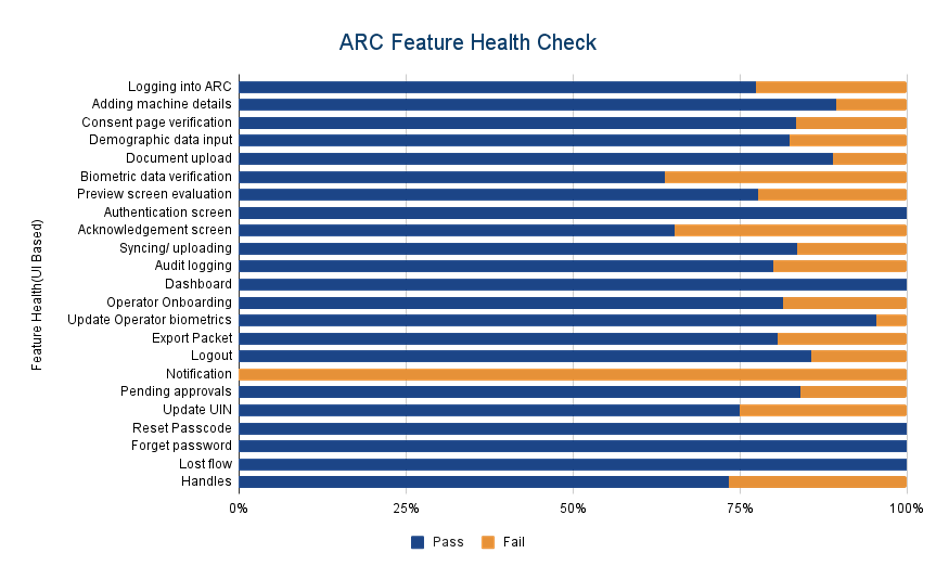
## Feature Health
## Test execution statistics
### Functional test results by modules
Below are the test metrics by performing functional testing using mock SBI and mock ABIS. The process followed was black box testing which based its test cases on the specifications of the software component under test. The functional test was performed in combination of individual module testing as well as integration testing. Test data were prepared in line with the user stories. Expected results were monitored by examining the user interface. The coverage includes GUI testing, System testing, End-To-End flows across multiple languages and configurations. The testing cycle included simulation of multiple identity schema and respective UI schema configurations.
Total
Passed
Failed
Skipped (N/A)
770
633
137
0
Test Rate: 100% With Pass Rate: 82%
UI Automation Reports (Locally Run):
Total
Passed
Failed
Skipped (N/A)
12
9
3
0
Test Rate: 100% With Pass Rate: 75%
ARC APK Git Commit ID: e3dd749f5942bccb0f7906b02815d6fb51e8f0e3
Client Version: 1.2.1.1
### Detailed Test metrics
Below are the detailed test metrics by performing manual/automation testing. The project metrics are derived from Defect density, Test coverage, Test execution coverage, test tracking and efficiency.
The various metrics that assist in test tracking and efficiency are as follows:
* Passed Test Cases Coverage: It measures the percentage of passed test cases. (Number of passed tests / Total number of tests executed) x 100
* Failed Test Case Coverage: It measures the percentage of all failed test cases. (Number of failed tests / Total number of test cases executed) x 10
For more details on the test results, refer [here](https://github.com/mosip/test-management/tree/master/ARC/ARC%200.12.0).
---
# Agent Instructions
This documentation is published with GitBook. GitBook is the documentation platform designed so that both humans and AI agents can read, navigate, and reason over technical content effectively. Learn more at gitbook.com.
## Querying This Documentation
If you need additional information that is not directly available in this page, you can query the documentation by asking a question.
Perform an HTTP GET request on the following URL with the `ask` and `goal` query parameters:
```
GET https://docs.mosip.io/1.2.0/roadmap-and-releases/releases/android-registration-client-0.12.0/test-report.md?ask=&goal=
```
`ask` is the immediate question: it should be specific, self-contained, and written in natural language.
`goal` is what the user is ultimately trying to achieve, the reason they need the answer. Sharing it helps GitBook give you a better, more relevant answer. A goal is most helpful when it describes the outcome the user wants rather than restating the question. For example, with `ask=how do I create an API token`, a goal like `automate deployments from our CI pipeline` lets GitBook tailor the answer to that use case.
The response will contain a direct answer to the question and relevant excerpts and sources from the documentation.
Use this mechanism when the answer is not explicitly present in the current page, you need clarification or additional context, or you want to retrieve related documentation sections.