> For the complete documentation index, see [llms.txt](https://docs.mosip.io/1.2.0/llms.txt). Markdown versions of documentation pages are available by appending `.md` to page URLs; this page is available as [Markdown](https://docs.mosip.io/1.2.0/interoperability/integrations/mosip-crvs-integration/integration-patterns-and-workflow/integration-flows/demographic-data-updates.md).
# Demographic Data Updates
## When Does It Happen?
Demographic updates occur when there are changes to an individual’s personal information, such as a name or Date of Birth (DOB). These updates are more common for infants in the pre-biometric stage but may also apply to minors or adults in specific cases. Such updates are initiated through CRVS based on requests raised by an introducer or another authorized informant who reports the required demographic change.
{% hint style="info" %}
**Note:** By default, demographic updates through CRVS integration is not supported for MOSIP IDs that already have biometrics linked. In such cases, MOSIP recommends that the resident visit a MOSIP registration center to request the update. Please [refer here](/1.2.0/interoperability/integrations/mosip-crvs-integration/integration-overview-and-context/integration-boundaries-and-real-world-implications.md) for more details.
{% endhint %}
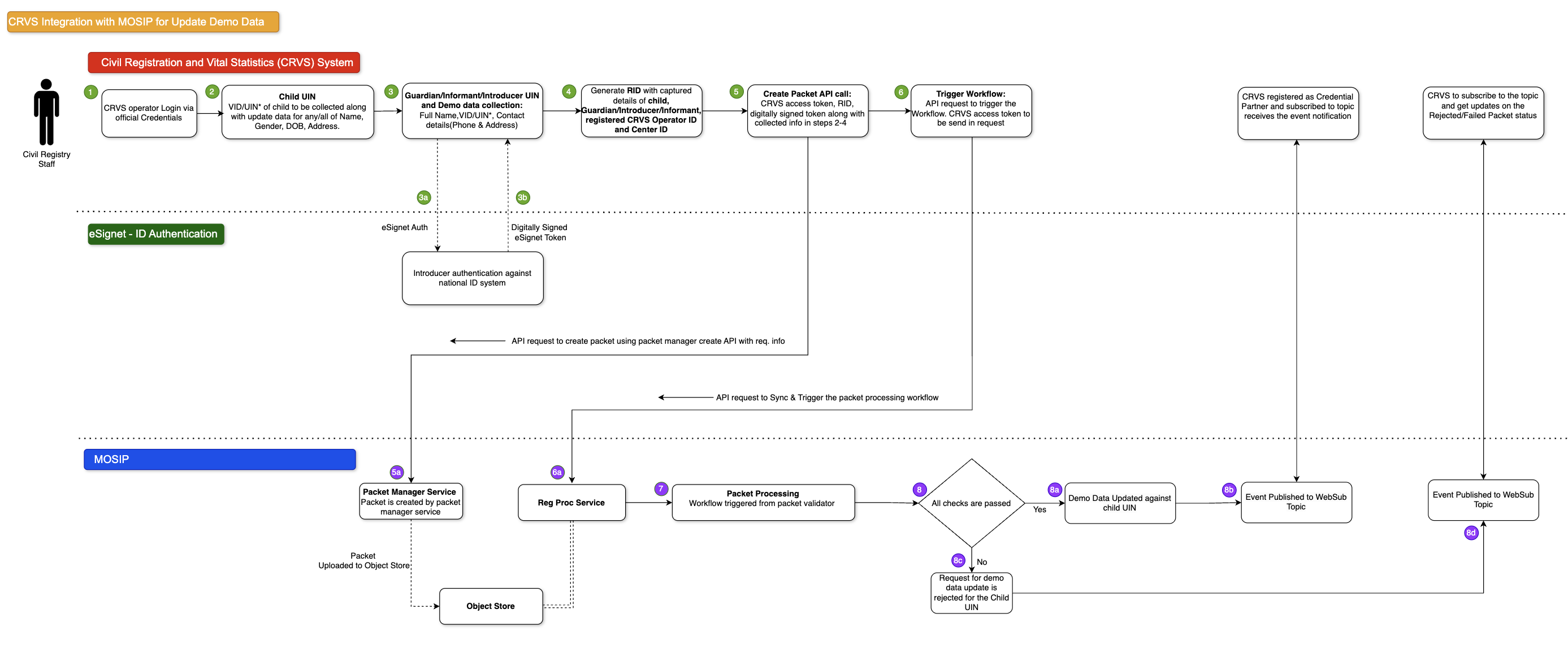
## **High-Level Workflow**
Infant Demo Data Update
## What Does MOSIP Do?
When MOSIP receives a demographic update request from CRVS, it performs the required technical validations and processes the request.
## **Demographic Update: Notifications to CRVS**
By default, MOSIP does **not** send a demographic data update acknowledgment to CRVS upon successfully updating the identity attributes.
If required, CRVS can be onboarded as a **credential partner** and subscribe to the relevant WebSub events. In this case, MOSIP can publish notifications of successful updates, allowing CRVS to track the completion of the data update process.
## What Is the Workflow?
A demographic update request is initiated by the CRVS system when an Introducer reports a change in the demographic details of an **infant MOSIP ID (without biometrics)**.\
The Introducer must be a registered user holding a valid MOSIP ID, which is authenticated using eSignet.\
Based on the request received from CRVS, MOSIP updates the permitted demographic attributes **only for eligible infant identities**, subject to applicable validations.
#### Step 1: Demographic Update Reported to CRVS
* The Introducer visits the CRVS centre to report a demographic change **for an infant**.
* The Introducer provides the required updated demographic details of the infant.
* The Introducer submits their own MOSIP ID for verification.
* The Introducer’s MOSIP ID is authenticated via eSignet.
* Upon successful authentication, the demographic update request is ready to be submitted to MOSIP for processing.
**Demographic Fields Supported by Default (Infants Only)**
By default, the CRVS–MOSIP integration supports demographic updates **only for infants (pre-biometric stage)** for the following attributes:
* **Name**
* **Date of Birth (DOB)**
* **Gender**
**Information Required for MOSIP Processing:**
* **Introducer Information** *(Additional fields can be included based on country requirements)*
* **eSignet User Info Token** – received as a response from eSignet upon successful authentication of the Introducer
* **Infant Information** *(Additional fields can be included based on country requirements)*
* **MOSIP ID** (UIN/VID) of the infant
* **Updated Demographic Attributes**
* Name
* Date of Birth (DOB)
* Gender
{% hint style="info" %}
**Note:** This list is configurable. The demographic fields eligible for update through CRVS can be defined by the implementing country based on local laws and policies.
{% endhint %}
#### Step 2: Packet Creation
To submit a demographic update request **for an infant**, the CRVS system must create a registration packet using the Packet Manager Create Packet API.\
This packet formally captures the update request for processing within MOSIP’s infant demographic update workflow.
#### Step 3: Packet Processing
After the packet is uploaded to MOSIP’s object store, CRVS initiates processing by calling the Sync and Trigger APIs.
During processing, MOSIP:
* Performs technical validations
* Confirms that the MOSIP ID belongs to an **infant without biometrics**
* Proceeds with demographic update processing only if the eligibility criteria are met
#### Step 4: Demographic Update Processing & Notifications
Once processing is completed successfully:
* MOSIP updates the demographic information **only for infant MOSIP IDs without biometrics**.
* If the MOSIP ID already has biometrics linked, **no update is performed** through this flow.
* A notification is sent to the registered email or phone number informing the resident of the update outcome.
**Optional:** If CRVS is onboarded as a credential partner and subscribed to the relevant WebSub topic, update notifications can be shared. This is not part of the default integration.
#### Duplicate Requests for Demographic Updates
Repeated demographic update requests for the same infant MOSIP ID are processed by MOSIP, and the **most recent update is applied** to the identity record.
{% hint style="info" %}
**Note**: MOSIP relies on CRVS to perform deduplication and treats CRVS as the source of truth. [Refer here](/1.2.0/interoperability/integrations/mosip-crvs-integration/integration-overview-and-context/core-integration-principles.md#crvs-as-source-of-truth) for more details.
{% endhint %}
#### Failure Handling in this Scenario
**Technical Failures:**
1. There is a possibility that some requests may fail due to failure caused by **internal MOSIP** technical problems during processing.
2. In case of internal processing issues within MOSIP, a **retry mechanism** automatically attempts reprocessing of failed requests
#### Handling Failures in this Scenario
| **Scenario** | **Existing Handling / Mechanism** |
| -------------------------------------- | ---------------------------------------------------------------------------------------------------------- |
| **Update Rejected (Biometric Linked)** | MOSIP currently does not support demographic updates for individuals with biometric-linked UINs from CRVS. |
| **Invalid Update Data** | MOSIP validates update requests and rejects invalid data. |
***
## Learn More
* [**Packet Manager**](/1.2.0/id-lifecycle-management/supporting-components/packet-manager.md) - Understand packet structure, validation, encryption/decryption, and how registration packets are stored and retrieved from object storage for processing.
* [**Registration Processor**](/1.2.0/id-lifecycle-management/identity-issuance/registration-processor/overview.md) - Explore the workflow engine that validates packets, performs deduplication, generates UINs, and orchestrates the complete packet processing lifecycle.
* [**WebSub Event System**](/1.2.0/id-lifecycle-management/supporting-services/websub.md) - Learn about MOSIP's publish-subscribe mechanism for real-time event notifications, topic registration, and credential delivery to subscribed partners.
* [**Notifications & Event Handling**](/1.2.0/interoperability/integrations/mosip-crvs-integration/notifications-and-event-handling.md) - Detailed guide on credential issuance notifications, packet status updates, WebSub subscription configuration, and error notification handling for CRVS integration.
---
# Agent Instructions
This documentation is published with GitBook. GitBook is the documentation platform designed so that both humans and AI agents can read, navigate, and reason over technical content effectively. Learn more at gitbook.com.
## Querying This Documentation
If you need additional information that is not directly available in this page, you can query the documentation by asking a question.
Perform an HTTP GET request on the following URL with the `ask` and `goal` query parameters:
```
GET https://docs.mosip.io/1.2.0/interoperability/integrations/mosip-crvs-integration/integration-patterns-and-workflow/integration-flows/demographic-data-updates.md?ask=&goal=
```
`ask` is the immediate question: it should be specific, self-contained, and written in natural language.
`goal` is what the user is ultimately trying to achieve, the reason they need the answer. Sharing it helps GitBook give you a better, more relevant answer. A goal is most helpful when it describes the outcome the user wants rather than restating the question. For example, with `ask=how do I create an API token`, a goal like `automate deployments from our CI pipeline` lets GitBook tailor the answer to that use case.
The response will contain a direct answer to the question and relevant excerpts and sources from the documentation.
Use this mechanism when the answer is not explicitly present in the current page, you need clarification or additional context, or you want to retrieve related documentation sections.